
WordPress 7.1: what changes and why it matters for your business
By Alfredo Navas
When a new WordPress release arrives, it is easy to get lost in block names, APIs, and interface changes. But the useful question for a business is not simply “what changed?” It is “what work will become clearer, faster, or more sustainable because of this change?”
WordPress 7.1 answers that question on two levels. On one hand, it brings already available improvements for design, content review, and image management. On the other, it continues to strengthen the technical foundation for integrating automation and artificial intelligence in a more structured way.
It is not a release that automatically turns a website into an AI assistant. Nor does it remove the need to define processes, permissions, and business goals. Its value lies in making WordPress more capable today and better prepared to evolve tomorrow.
What is already available in WordPress 7.1
More responsive control, directly in the editor
The same content is viewed on phones, tablets, and computers. Until now, many adjustments for different screen sizes depended on the theme, custom CSS, or help from the development team.
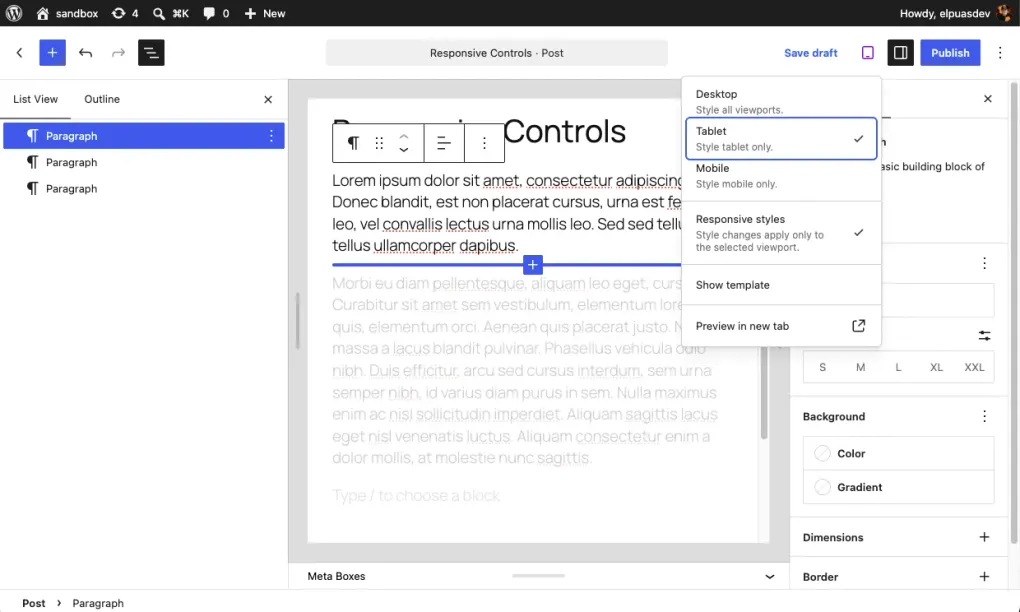
WordPress 7.1 lets teams define responsive block styles from the editor, both in Global Styles and on individual blocks. It also adds controls for interaction states such as hover, focus, and active. Themes can configure mobile and tablet breakpoints through theme.json. These are stable capabilities in this release. The official release documentation explains their scope.
For marketing and content teams, the benefit is greater autonomy with clear boundaries: adjusting the presentation of a campaign or landing page without turning every visual change into a development ticket. For product and technology teams, the benefit is consistency: approved design rules can live in the platform instead of being repeated in isolated solutions.
That does not mean anyone should redesign a critical page without review. It means a well-configured site can give each team the controls it genuinely needs.
Notes: a conversation where the content lives
Editorial approvals often become scattered across emails, chats, documents, and screenshots. The result is familiar: someone asks to “change the second paragraph,” but no one is entirely sure which version they are looking at.
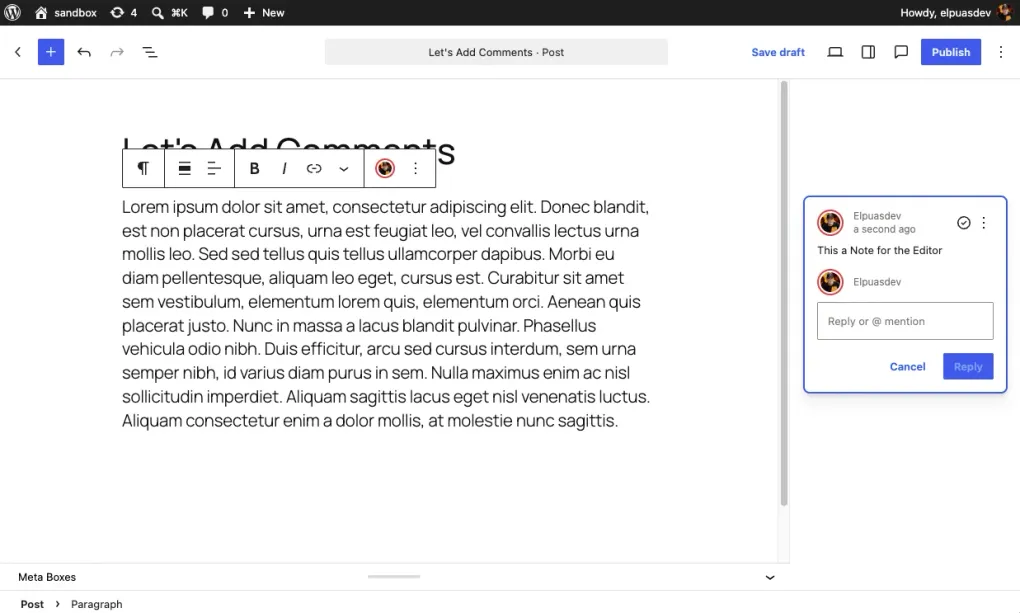
In WordPress 7.1, Notes lets users leave comments on a text selection, create more than one conversation per block, and use rich text and mentions with email notifications. These features are included in the stable release, not a future promise. The official announcement details these improvements.
For an editorial team, this can reduce lost context and make it clearer who needs to respond, review, or approve. It does not replace an editorial workflow or a person accountable for publishing; it does bring the conversation closer to the asset under review.
Images: less friction when publishing, less load on the server
Large images are a common source of slow publishing, upload errors, and unnecessary server resource use. WordPress 7.1 redesigns the media-editing flow and moves compression, resizing, and thumbnail generation into the browser through a WebAssembly build of libvips. It also adds built-in support for AVIF, HEIC, and HDR gain maps. WordPress documents these media and performance changes.
From a business perspective, this can make the work of teams that frequently publish product, property, event, or campaign images more resilient, especially with large files and shared hosting. It does not replace an image strategy: teams should still define dimensions, target file weight, usage rights, and visual review before publishing.
More native capabilities does not mean “zero plugins”
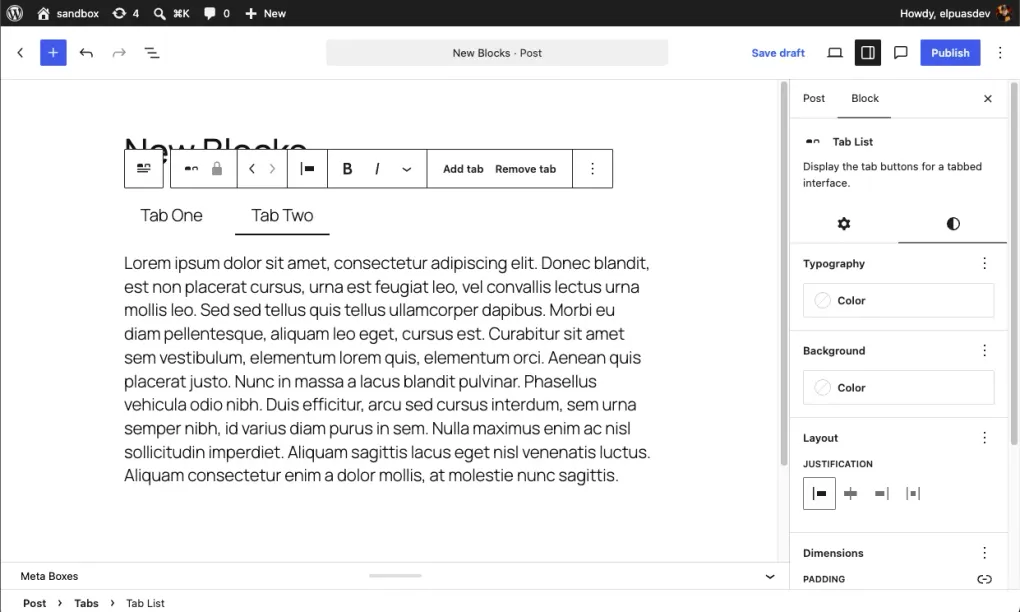
WordPress 7.1 adds blocks such as Tabs and Playlist, along with other controls that may previously have required an extension or custom code. The trend matters: when a core capability covers a real need, a project can reduce external dependencies and their maintenance burden.
The right decision is not to remove plugins on principle. A well-maintained plugin is still the best choice when it provides a specific function WordPress does not cover. The more practical question is: does this dependency add distinct value, or does it simply replicate a capability the platform already provides?
At EPDC, we prefer to start with native capabilities, configure the theme well, and add extensions only when the business need justifies them. It is a way to keep a site easier to update, audit, and evolve.
The Abilities API: WordPress starts describing what it can do
The least visible part of WordPress 7.1 is also one of the most interesting for product and technical decision-makers. The Abilities API, available since WordPress 6.9 and expanded in 7.1, provides a standardized way to register, discover, and execute the capabilities of a website or its extensions.
An ability can have a description, defined inputs and outputs, validation, and permissions. Rather than forcing every integration to understand each plugin internally, WordPress can expose specific functions in a structured way. The official Abilities API guide identifies discoverability, validation, and permission control as benefits; the WordPress 7.1 announcement confirms its improvements for automation and AI-assisted integrations.
For a business, the translation is straightforward: if the site needs to connect to a CRM, an internal tool, or an automation tomorrow, the important actions should be clearly defined and protected. For example: checking availability, creating a draft, updating a product, or preparing a report. The API does not create those integrations on its own; it provides clearer infrastructure for building them responsibly.
WordPress AI Client: a common layer, not a ready-to-enable “bot”
The WordPress AI Client is already integrated as a common layer that lets developers connect AI functionality without writing a different integration for every provider. The site owner chooses and configures the provider; the plugin describes the needed capability, and WordPress looks for a compatible model. The official documentation explains this provider-agnostic approach.
This matters because it prevents each feature from being tied to a single model or a separate credentials page. It also helps teams evaluate AI functionality as part of the site architecture, rather than as an isolated add-on installed because it is fashionable.
One distinction matters: WordPress 7.1 does not include a visible, general-purpose assistant in every site’s dashboard. The stated priority has been to give plugin authors and integrators a foundation. Each use case must confirm that a provider is configured, that the model can perform the task, and that its costs, permissions, and data handling are appropriate. The WordPress AI team explains this in its WordPress 7.1 update.
What is still in development: streaming, embeddings, and agents
It is worth honestly distinguishing the platform that is available today from the direction still being built.
Work on streaming in 7.1 was introduced first in the PHP AI Client, not as a capability natively supported by WordPress. Servers and hosting platforms still need to support long requests for a response to be displayed progressively. Embeddings, meanwhile, represent the meaning of content and can provide a foundation for semantic search, but vector search is officially described as an experiment in the AI plugin. WordPress’s technical AI Client update distinguishes these states.
There is also no universal “business agent” that can manage a website without configuration. The future direction is more interesting—and more demanding: combining structured capabilities, explicit permissions, quality data, and a common interface so automations or agents can help with specific tasks.
That is where AI can go beyond writing another article. With a well-defined use case, it could help find related content, prepare a draft from approved information, classify an incoming request, or gather data for human review. To take actions in business systems, it will remain essential to define what it can do, which data it can use, who authorizes it, and how the result is reviewed.
What a business should do now
There is no need to adopt every new feature or transform a stable website overnight. But this is a good time to ask more useful questions:
- Does the theme and its blocks let the content team make safe responsive adjustments?
- Does the editorial process have owners, approvals, and one place for feedback?
- Are images published with guidance for formats, file weight, and usage rights?
- Which plugins are truly necessary, and which duplicate WordPress capabilities?
- Which site data and actions should be defined before they are automated?
The answers to these questions prepare a better operation today, even if the business decides not to implement AI yet.
WordPress 7.1 is an operational improvement and an architectural decision
For EPDC, the value of WordPress 7.1 is not in chasing an AI label. It is in building sites that make publishing easier, enable smoother collaboration, depend on fewer unnecessary pieces, and expose business capabilities securely when it makes sense.
A modern WordPress site is not only a collection of pages: it can bring together content, products, forms, integrations, and processes. When that foundation is well designed, it becomes much easier to evaluate automations and AI tools without sacrificing control, security, or maintainability.
Would you like to assess which parts of your WordPress site could improve?
At ElPuas Digital Crafts, we review your site’s architecture, editorial workflow, and dependencies to prioritize improvements that deliver real value today and prepare it to evolve tomorrow.